May 15, 2026By Marcus G. (Opener Specialist)Troubleshooting
Step-by-Step Guide: How to Adjust Garage Door Opener Travel Limits
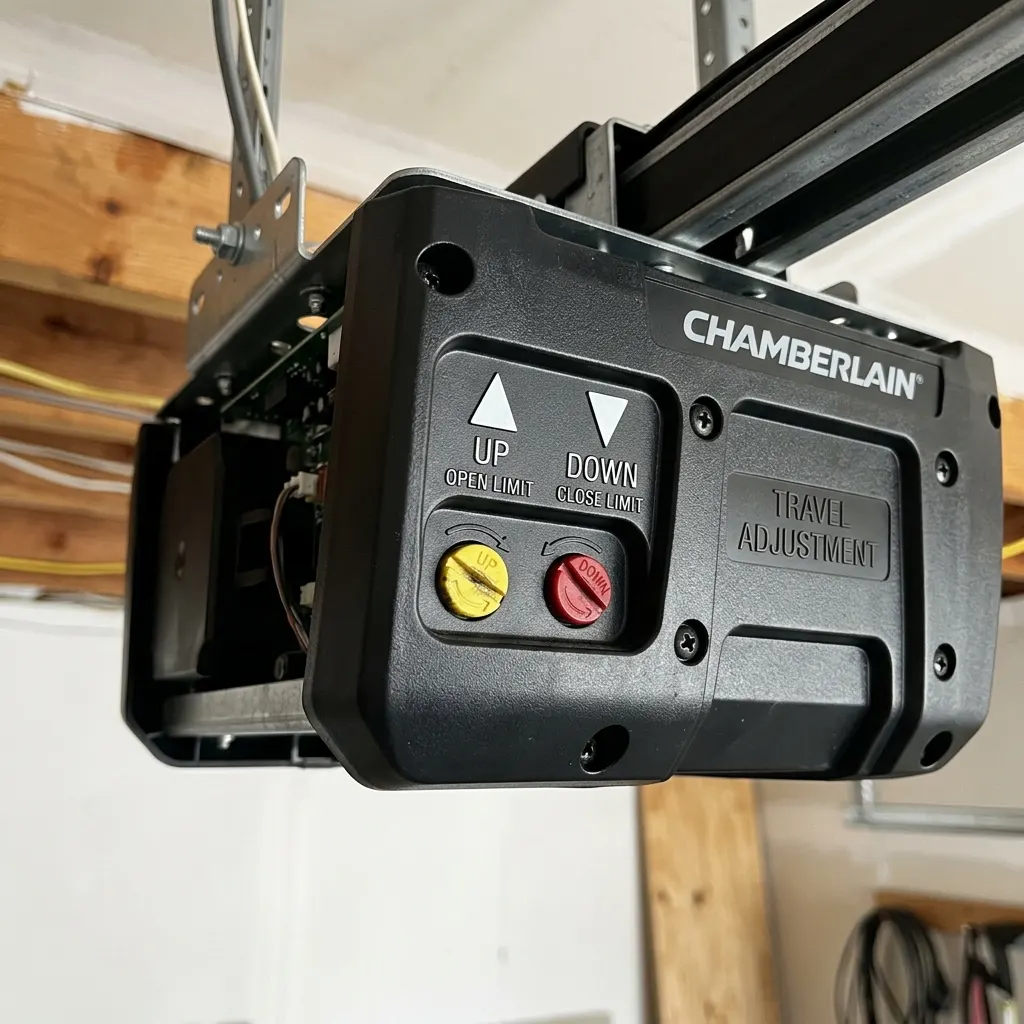
If your garage door is stopping a few inches short of the ground, or hitting the floor and immediately reversing, the issue is likely your opener's travel limits. The travel limits tell the motor exactly how far to run the trolley before stopping.
Types of Travel Limit Adjustments
Different openers handle travel limits in two ways:
- Mechanical Limit Screws: Older openers have two plastic screws on the side or back of the motor casing, labeled "Open" and "Close" with arrow indicators. Turning these screws with a flathead screwdriver adjusts the travel distance.
- Digital Program Buttons: Modern smart openers (like LiftMaster MyQ) use electronic setup buttons. You hold the adjustment button until the lights flash, then manually drive the door to the correct floor position and save the setting.
Step-by-Step Adjustment Protocol
To fix a door that doesn't close fully:
- Locate the adjustment screws or buttons on the motor unit.
- Turn the "Down" or "Close" adjustment screw in the direction of the arrow (typically one full turn equals 2 inches of travel).
- Test the door by pressing the button. Repeat the process in small increments until the weather seal rests flat against the floor.